
Download WhatsAppCopilot – AI‑Powered WhatsApp Assistant for iPhone
Introduction
In an age where instant messaging dominates both personal and professional communication, the speed and relevance of every reply can make a huge difference. WhatsAppCopilot steps into this landscape as an AI‑driven sidekick built especially for iPhone users who rely heavily on WhatsApp. Leveraging the latest ChatGPT technology, the app watches the flow of your chats, analyses tone, and instantly suggests context‑aware replies that you can send with a single tap.
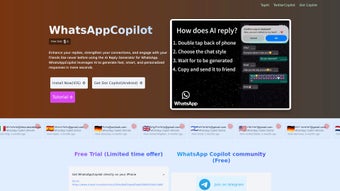
The standout feature is the double‑tap activation on the back of the iPhone, a native iOS accessibility option that eliminates the need to open a separate app or navigate through menus. Whether you are handling a fast‑moving group discussion at work, keeping up with family updates, or chatting with friends across different time zones, WhatsAppCopilot promises to reduce typing fatigue, keep your messages on‑brand, and help you stay responsive without sacrificing the personal touch that makes messaging feel human. This review explores the app’s core capabilities, installation process, compatibility considerations, and the pros and cons that matter most to potential users.
Overview & Core Features
WhatsAppCopilot is more than a simple autocomplete tool; it is a full‑featured conversational assistant that integrates directly into the iPhone’s messaging environment. The app operates in two subscription tiers: the “Normal” tier, which utilizes the efficient GPT‑4o‑mini model for fast, text‑only suggestions, and the “Ultimate” tier, which unlocks the full GPT‑4o model capable of visual recognition. Visual recognition enables the AI to interpret images, screenshots, emojis, and even handwritten notes, delivering richer and more accurate replies.
Users can customize response styles—formal, casual, concise, humorous, or a personal preset—ensuring that each suggestion aligns with their unique voice. A built‑in tutorial guides newcomers through every feature, while live chat support is available for troubleshooting. Security is a top priority; all data is transmitted over encrypted channels, processed in real time, and never stored long‑term, complying with GDPR standards.
Multi‑language support covers over 30 languages, automatically adjusting tone and idiomatic expressions to fit each linguistic context. Below is a concise list of the most compelling features:
- Double‑tap activation: Instantly summon the AI by tapping the back of your iPhone, leveraging Apple’s native Back Tap accessibility.
- Real‑time tone analysis: Context‑aware suggestions that match the emotional nuance of the conversation.
- GPT‑4o‑mini model: Fast, cost‑effective text‑only replies for everyday use.
- GPT‑4o with visual recognition: Understands attached images, screenshots, emojis, and provides image‑aware responses.
- Customizable response styles: Choose from preset tones or create your own to maintain a consistent personal brand.
- One‑tap send: Insert and send AI‑generated replies with a single tap, or edit before sending.
- In‑app tutorial & live support: Step‑by‑step onboarding and 24/7 chat assistance.
- Secure, GDPR‑compliant processing: Encrypted transmission, no long‑term storage of chat content.
- Multi‑language support: Over 30 languages with locale‑specific tone adjustments.
- Flexible subscription plans: Monthly or annual billing, free trial for new users, and easy cancellation via Apple ID.
Installation, Usage & Compatibility
Getting started with WhatsAppCopilot is designed to be as frictionless as the app itself. Open the Apple App Store, search for “WhatsAppCopilot,” and tap Get to download the free version. After the download completes, launch the app and grant the required screen‑reading permission; this permission allows the AI to capture the visible text on your screen for processing. The first run launches a concise onboarding wizard where you will:
- Enable the Back Tap feature in Settings → Accessibility → Touch → Back Tap and choose a double‑tap gesture.
- Select your preferred response style from the list of presets.
- Choose a subscription tier (Normal or Ultimate) or start with the free trial.
- Review the privacy policy and confirm data handling preferences.
Once configured, WhatsAppCopilot runs quietly in the background, listening for the double‑tap gesture. When you double‑tap the back of your iPhone while a WhatsApp conversation is open, a non‑intrusive overlay appears, presenting up to three AI‑generated reply options. You can tap a suggestion to insert it directly into the text field, edit if desired, and then hit send. The overlay automatically disappears after a few seconds of inactivity, preserving the native WhatsApp experience.
Compatibility is currently limited to iPhone models running iOS 15 or later because the double‑tap activation relies on Apple’s built‑in accessibility APIs. The app is optimized for iPhone 12, 13, 14, and newer models, but it will also function on older devices that support iOS 15. Android users cannot install WhatsAppCopilot at this time, although the development team has indicated plans for a future Android version.
Pros
- Hands‑free double‑tap activation dramatically speeds up response time.
- Advanced AI models (GPT‑4o‑mini and GPT‑4o) provide industry‑leading accuracy.
- Visual recognition in the Ultimate tier adds a new dimension to conversational AI.
- Highly customizable tone settings ensure replies reflect your personal brand.
- Secure, GDPR‑compliant data handling builds trust with privacy‑concerned users.
- Supports over 30 languages, making it useful for multilingual groups.
- Free trial and flexible billing options allow risk‑free testing.
Cons
- Only available on iOS, excluding the large Android user base.
- Subscription cost may be a barrier for casual messengers.
- Screen‑reading permission can be a privacy concern for some users.
- Initial onboarding involves several steps that may overwhelm non‑technical users.
- Performance can vary on older iPhone models with limited RAM.
- Visual recognition feature is locked behind the higher‑priced Ultimate tier.
Frequently Asked Questions
Does WhatsAppCopilot store my chat history?
No. The app only sends the text visible on the screen to the AI for immediate processing and discards it right after generating a response. No long‑term storage or logging of your conversations occurs.
Can I use WhatsAppCopilot with other messaging apps?
Currently the AI is tightly integrated with WhatsApp on iPhone. Future updates may expand support to iMessage and other popular messaging platforms, but those features are not available today.
What is the difference between GPT‑4o‑mini and GPT‑4o?
GPT‑4o‑mini is a lightweight, cost‑effective model optimized for fast text‑only suggestions. GPT‑4o is the full‑size model that can also interpret images, emojis, and screenshots, delivering richer, context‑aware replies.
How do I cancel my subscription?
Subscriptions are managed through your Apple ID. Open Settings → [your name] → Subscriptions, locate WhatsAppCopilot, and tap “Cancel Subscription.” The cancellation takes effect at the end of the current billing cycle.
Is the double‑tap activation safe for my iPhone?
Yes. The feature uses Apple’s built‑in Back Tap accessibility option, which does not interfere with hardware or compromise security. It simply triggers a software event that launches the WhatsAppCopilot overlay.
Do I need an internet connection for WhatsAppCopilot to work?
An active internet connection (Wi‑Fi or cellular data) is required because the AI processing happens on remote servers. Without connectivity, the overlay will appear but no suggestions will be generated.
Conclusion
WhatsAppCopilot merges cutting‑edge AI with iOS‑native convenience, delivering a seamless experience for anyone who spends a significant amount of time on WhatsApp. The double‑tap activation eliminates friction, while the tiered GPT‑4o models give users the flexibility to choose between fast text‑only assistance and a premium visual‑aware companion. Security‑first design, extensive language support, and deep customization options make the app a compelling productivity boost for professionals, students, and casual users alike. The main drawbacks—iOS‑only availability and a subscription price that may be steep for occasional users—are offset by the time saved and the enhanced quality of communication. If you’re ready to upgrade your messaging workflow and enjoy AI‑generated replies that feel natural and on‑brand, download WhatsAppCopilot today, start with the free trial, and experience a smarter way to chat.



.png)



